HBO-ICT.
Portfolio
Assets and Design
Sprint 4
As a 3D designer, my goal is to create visually captivating and immersive game environments. I plan to achieve this by constructing various environments such as Hub, Seeds game, Mountain game, Mining game environments.
Sprint goal
Exploration
After receiving feedback, our group recognized the importance of the order of the game ensuring a smooth and coherent game experience. I started to draw details or the game order and what the environment of each game and hub looks like. I write about the order of experience and the game flow.The game will begin with the Seeds game, which players will encounter upon entering the hub. After completion, players will be teleported to the Shoe mountain, where they will engage in a challenging climbing game. As the climbing game ends, players will find themselves at the entrance of the Mineral game. To enhance the overall experience, we have incorporated portal checkpoints between each stage, allowing players to review and appreciate the changes they have made throughout the game. In terms of environment design, our team has decided to utilize some assets available in Unity while also creating impactful assets of our own. This combination of pre-existing assets and custom creations will help us shape visually stunning and immersive game environments.
Animation importing

Result of wrong export and import animation

Right format for exporting from Blender


As the first step, I focused on designing the hub area. This space would feature portals, entities, and shoes. To realize the hub, I imported an animated entity into Unity first. While searching for tutorials on how to export animations from Blender to Unity, I encountered various methods that didn't bring the desired results. However, eventually, I found the correct exporting format. During the tutorial, I learned about essential considerations such as geometry, animation baking, transforms, and inclusion checklists. In the transform settings, I made sure to change the forward direction from "- Z forward" to the direction supported by Unity. In the animation baking process, I unchecked NLA strips and enabled the "Force Start/End Key" option. Additionally, I ensured that the selected objects, armature, and mesh object types were checked in the operator presets. After exporting the entity as an FBX file, I imported it into Unity and applied the materials that I had textured using Substance Painter. The textures appeared faultless within Unity. To make the animation work, I imported the FBX file into the animation timeline and created a movement animation within the Animator component. For added convenience and a more engaging experience, I implemented a looped movement animation in the hub, allowing the entity to continuously move around the scene and provide instructions.

Texture import in Unity


Animation application
My teammate and I got on the creative process of ideating and designing the seed game environment for our overall game experience. In line with our previous discussions, we aim to imbrace our game environments with a utopian and soft surrealism style, focusing on aesthetics and visual appeal. To achieve this, we decided to use some of the presets available in Unity. However, we also made a conscious decision to modify these presets to align with our unique artistic style. To begin, I took the sketch of a drawing that envisioned seed game environment which allowed us to visualize and refine our ideas. As part of the design process, we decided to convert from the traditional green color of grass to shades of purple and blue, creating a more dreamlike atmosphere. Furthermore, we made a choice to deviate from conventional tree structures, opting instead to incorporate elements such as sea trees or mushrooms to evoke a sense of surrealism within the environment.
Seed game design


Grass color changing through Photoshop
Different photoshoped grass colors as pink, purple, blue


Mushroom trees with sea trees
As we reflected on the atmosphere of the Seeds game, we realized the potential harmony between its natural vibe and the futuristic feel of the Hub. To address this, we decided to incorporate a futuristic greenhouse into the seed game, establishing a strong thematic relationship. To bring this concept to life, I began constructing the greenhouse using individual spheres and cylinders, simulating a realistic construction process. However, upon completing the greenhouse, I realized that it contained an excessive number of vertices, which could impact performance and efficiency.Realizing the need for a more optimized approach, , I began looking for an alternative to greenhouses. This technique involved starting with an ice sphere, adding extrusions for barbels, selecting grouped elements, and separating the glass and iron sections to allow for different textures.
Modeling greenhouse design

Inspiration

Low poly count green house
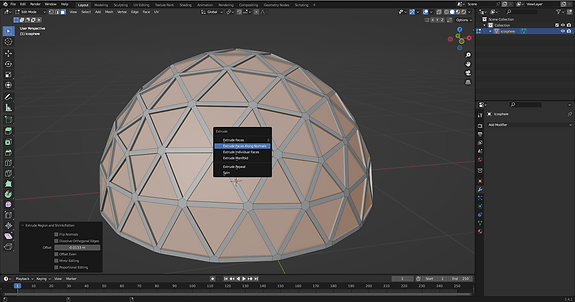
Extruding

Drawing green house

Edit mode and remove half of ice sphere

Devide as glass part and iron part for different texture

Too many poly thorugh spheres and cylinders

Selecting as group of same shape
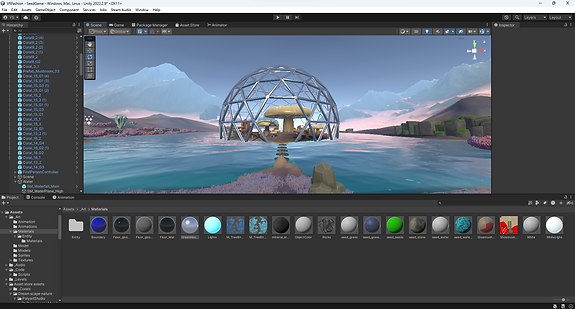
Low poly count green house
In our game, the main elements are the shoe and mushroom. As a result, I set out to design a unique mushroom resembling a shoe. Following a tutorial, I began by creating a circular shape and continuously extruding it to form the stem. Another circle was added to form the mushroom cap, and using edit mode, I connected the stem and cap by creating vertices and faces. Once the basic shape was sculpted, I proceeded to unwrap it and imported it into Substance Painter for texturing. Drawing inspiration from images of red mushrooms, I applied textures and added additional detailing using Photoshop. This mushroom asset serves a dual purpose: it is utilized in the hub's portal design and within the seed game environment itself. By crafting these assets and incorporating them into our game, we aim to enhance the overall visual experience and maintain coherence components of our project.
Modeling the mushroom

Started as circle


Add face(Ctrl+f)

Sculpting as shoe shape


Texturing in Substance painter
Photoshoping for details

Mushrooms in Hub design
Decoration with sea trees
I created the hub design by combining the images that our group found inspiring. We included various elements such as entities, shoes, and portals, and integrated them into different sections to convey the storyline of the game within the hub. As a first task, I focused on decorating the portals to indicate which games they lead to. For instance, the climbing game portal is represented by rocks positioned next to it, the seeds game portal is covered with mushrooms, and the mineral game portal showcases falling minerals through it. To enhance the ambience of the hub, I decided to incorporate a manmade firefly as a source of lighting, inspiration from natural fireflies. I scattered sphere-shaped light balls throughout the area. During the VR experience simulation, I identified some improvements that could enhance the overall user experience. Firstly, I realized that the rotating entity was unnecessary and could be stationary. Secondly, the size of the entity seemed a bit small and could be adjusted for better visibility. Moreover, the tables under the shoe display resembled steps, which confused players into attempting to step on them. As the portals are positioned in a floating position which make difficulty for players to enter, I decided to add proper steps to the portal.
Hub design

Inspiration


First version of hub
Hub design drawing

Portals design


Shoe and shoe table design
Entity showing design


Modeling steps in Blender
Texturing steps in Substance painter
Hub with steps design
During the sprint review, we received feedback that suggests as a guideline for the seed game. Our plan was to create a pattern on the bottom of the shoe where players would plant seeds. However, in the current version of the seed game, there is no designated area for placing the seeds. To address this, I made the decision to design a fence in the shape of a shoe and added a surrounding fence to provide players with clearer guidance on where to plant the seeds for creating patterns. Using Blender, I began by tracing the bottom of the shoe and then extruding it to create the length of the fence. I also added a top edge to give the fence a more realistic appearance. Since tracing the shoe resulted in a high polygon count, I reduced it by dissolving unnecessary edges in the wooden panels of the fence. Instead of creating holes between the wood panels, I decided to flip the faces that would not be visible in Unity. After completing the fence model, I imported it into Substance Painter and started painting a brown wood texture. To enhance the realism, I applied a grunge mask and sharpening effects to the base color of the brown wood.
Modeling seed fence

Seedgame field before fence.

Tracing bottom shape of the shoe and exturde and create seperate edge

Inspiration

Dissolving the edges

Texturing in the Substance Painter

Seed fence in Unity
Reflection
Throughout this sprint, I adopted multiple perspectives, starting from an environment designer role to create a captivating game environment. I also assumed the role of a 3D designer, crafting intricate models. As a player, I objectively assessed and improved the game experience. Additionally, I embraced the role of a communicator, effectively liaising with the group and offering assistance wherever possible.I took on the task of working on the environment design, which plays a crucial role in enhancing the overall project. My main focus was on creating a cohesive scene by modeling and integrating various assets. Along the way, I supported my fellow team members in their asset creation efforts by asking and assistancing whenever needed. I've paid attention to communication with other team members and keep asking what support they would need in the creation of the assets. To ensure a smooth and immersive experience for players, I continuously checked the progress through the headset, making necessary adjustments along the way. For instance, I identified several improvements required for the portal steps to ensure smooth entry for players. I also recognized the need for a shoe fence to establish clear boundaries for the seeding game. Furthermore, I realized that the shoe table should not resemble the steps to avoid any confusion.